AI Executive Assistant vs Virtual Assistant for Email

Ulric Musset · CEO, Marblism

For the inbox, an AI assistant handles volume and a virtual assistant handles judgment. AI clears triage, drafting, and scheduling around the clock for $24 to $44 a month. A human reads the room on the messages that carry real risk. Most owners get more from splitting the inbox between them than from picking a side.
If your inbox runs your day, the numbers say you are not unusual. Microsoft's Work Trend Index puts the average worker at 117 emails a day, and its telemetry has 40 percent of people who are online at 6am already reading them, with nearly a third back in the inbox by 10pm. That is the day both options are sold against.
AI and a virtual assistant split the inbox by message type, not by which one is smarter. The decision that actually matters is which messages go where. One randomized trial measures how much email work AI removes, and its number decides how you split the inbox.
TL;DR
Give the repeatable part of your inbox to AI and keep a human for the part that needs judgment. A randomized study of more than 7,000 workers, published by the NBER, found AI cut email time by about a third for the workers who actually used it in most weeks, and by 1.3 hours a week across everyone who was offered it. Either way it is a share of the job, not the job.
A human virtual assistant still wins on the client who needs handling and the thread where the wrong reply costs you money. Sort your inbox by message type first, then decide.
What each one actually does with your inbox
Choosing an AI executive assistant versus a virtual assistant starts with knowing what each one actually touches. An AI email assistant is software that connects to your mailbox and works it on its own: sorting what arrives, summarizing long threads, drafting replies in your voice, booking meetings, and nudging the threads you flagged for follow-up.
An email management virtual assistant is a person, usually remote and usually part-time, who does the same list by hand to a system you agree with them.
The difference that matters is not intelligence. It is what happens to a message neither of them has seen before.
AI email assistants
An AI email assistant runs continuously and treats every message the same way at 2am as at 2pm. It is strongest on the patterned work: filing, unsubscribing, summarizing, and writing the reply you have already written a hundred times. It is weakest the moment a message needs context that never appeared in your sent folder. Give it two weeks before the drafts sound like you, and keep an approval step on anything a client will read.
The category is wider than email alone, and our guide to what an AI executive assistant is and where the category stops maps the five types.
Email management virtual assistants
An email management virtual assistant brings judgment on day one and relationships by month three. They notice the client who has gone quiet, know which thread is really a phone call, and can chase three people across a week to unblock something. They also work set hours, take holidays, need onboarding, and cost between $19 and $36 an hour in the United States, per PayScale and Project Untethered's survey of 147 assistants.
What AI actually removes from your inbox, measured
AI removes about a third of the time you spend on email, not all of it. That figure comes from the only properly controlled measurement of the question: a six-month randomized field experiment across 7,137 workers, published as an NBER working paper by Dillon, Jaffe, Immorlica and Stanton.
Before the tool arrived, the average worker in that study spent 11.7 hours a week reading and answering email, more than a quarter of a working week. Workers who used the AI in most weeks of the study spent 3.6 fewer hours a week on it, a 31 percent drop. Across everyone offered the tool, including the people who barely touched it, the saving was 1.3 hours a week.
Several authors of that paper worked at Microsoft, which makes the tool studied. NBER's disclosure records that Microsoft reviewed the paper only for privacy, and that the authors kept full discretion over the results.
The tool was also a drafting assistant that helps you write, not a delegation assistant that clears the inbox for you. Neither the 31 percent nor the 1.3 hours reads cleanly across to a different class of tool, so treat both as the size of the effect that has actually been measured rather than a promise about yours.
Key point: a third of your email time is a large, real saving, and it is nowhere near the whole job. That gap is exactly the space a human still occupies.
Where an AI assistant still loses the inbox
An AI assistant loses the inbox on the message it quietly decides you do not need to see. Filing is its most useful trick and its most expensive failure, because a message routed into a folder you never open has been lost more thoroughly than one buried in a full inbox.
A filed message once cost a leader a client contract. Lift Business Resources tells the story: the productivity app tidied a critical message out of sight, and by the time anyone noticed, the deal behind it was gone. The same pattern shows up across low-star reviews, where the recurring admission is "I assumed the app would surface anything important."
Lift sells human assistants, so read the framing with that in mind. The failure itself is not in dispute, and it is the one to design around.
Chasing works only on what you have flagged. An account that simply goes quiet for three weeks produces no message, so there is nothing for the assistant to act on, and no feature list will tell you that.
The first fortnight is also spent correcting drafts, which is work before it is a saving.
Where a human virtual assistant still wins
A human virtual assistant wins on every message where the right answer depends on something outside the thread. That is a smaller share of the inbox than most owners assume, and a more valuable one. It tends to be the whole share for a regulated or highly specialized practice, where a compliance rule or an industry norm decides the reply and no general-purpose tool has been trained on it.
Three jobs stay human. Reading tone, where a polite email is actually a complaint and the reply decides whether the client stays. Holding one problem together across several people and several days, going back to each of them, making small calls about priority as it goes. And representing you, where the person on the other end needs to feel they reached your side rather than your software.
That middle one is the cost people miss. Mubashar Ali replaced a $2,100-a-month assistant with about $80 a month of tooling and wrote up what happened six months later. The coordination did not disappear, it moved to him, at 3 to 5 hours a week, part of the 6 to 8 hours of absorbed admin he ended up carrying in total.
His summary was blunt: "AI handles process better than humans. Humans handle judgment better than AI." What he got wrong was treating the decision as a swap. It needed a rebuild of who does what.
Sort your inbox into four piles
Before you choose, sort a week of real email into four piles, because the answer is different for each one and nobody has an inbox made of only one.
Open your sent folder and your archive for the last five working days, and put every message into one of these.
If you run on Outlook, set up Focused Inbox, action folders, categories, and rules to apply this same sorting. Our guide to organizing Outlook email walks through each step.
Noise. Newsletters, receipts, calendar notifications, cold pitches. Usually the biggest pile by count and the cheapest to lose. Hand it to AI with no approval step at all.
Routine. The reply you have written a hundred times: the pricing question, the availability check, the document you always send. Patterned enough that drafting it is exactly where AI's measured time saving comes from. AI drafts, you approve, and after a fortnight you are approving more than you are editing. Single-thread reminders belong here too, the "did you get this" nudge on a message you already flagged, which is a rule rather than a judgment.
Relationship. Fewer messages, much higher stakes. The client mid-project, the partner you need something from, the supplier who has let you down. This is also where multi-party chasing lives, the problem that needs someone to work three people at once and decide in the moment whose answer to wait for. Keep a person on this pile, whether that is a virtual assistant who knows your accounts or you.
Risk. The handful a week where a wrong answer costs money or reputation. Pricing exceptions, complaints, anything legal, anything a lawyer or accountant would want to see. This pile is not delegable to software or to staff. It is yours.
Then count twice, because the two counts disagree and only one of them should decide. Count messages first. Noise and Routine will win that count for almost everybody, which is exactly why sheer volume is a bad reason to hire a person.
Then estimate minutes per pile across the same five days. If Relationship and Risk together take more than about half your inbox hours, no subscription is going to fix your week, and the money is better spent on a few hours of a person for those two piles. Under half, start with software and re-run the count in a month.
The reason to do this on paper rather than by feel is that the two piles that hurt most are the two that are smallest. Risk messages are memorable precisely because they are rare, so an inbox that feels like nothing but hard decisions is usually an inbox with four hard decisions and three hundred receipts.
What each option costs for the inbox
For inbox work specifically, the cost gap is not incremental. It is roughly a hundred times more expensive at the top end. The rates come from PayScale and Project Untethered: $11.33 an hour average for Philippines-based assistants, $35.61 for US freelancers, plus published agency rate cards. The in-house figure is federal wage data.
If you are pricing out a human hire on its own, the full rate ladder across every model, offshore to in-house, is in our virtual assistant cost breakdown.
| Option | Typical cost | Covers |
|---|---|---|
| AI email assistant | $24 to $44 a month, flat | Noise and Routine, around the clock |
| Offshore VA, part-time | $3 to $15 an hour | All four piles, at your working hours, if you write the process down |
| US freelance VA | $19 to $36 an hour | All four piles, US hours, you do the vetting |
| Managed US agency | $1,200 to $3,000 a month part-time | All four piles, vetted and replaceable, at a premium |
| Full-time in-house EA | About $9,100 a month loaded | The whole role, dedicated |
That last figure is the one owners underestimate. The median US executive assistant earns $76,590 a year in federal wage data, and benefits add roughly 30 percent of total compensation on top, which lands the real cost near $109,000 a year.
Put plainly: an AI assistant at $24 a month costs $288 a year against $18,000 for a $1,500-a-month managed assistant, a saving of $17,712 a year, or 98 percent. Over three years that is $53,136. The catch is coverage: the $288 tool clears Noise and Routine, and the $18,000 assistant is the only one of the two that also touches Relationship and Risk.
Splitting the inbox saves the most money
The setup that pencils out for most small businesses is not one option or the other. It is AI on the repeatable piles plus a few hours of a human on the rest, and it costs less than either full option while covering more of the week.
How I split it
If I ran this today, here is the split I would use. Say you currently pay a managed assistant $1,500 a month, or $18,000 a year, mostly for inbox work. Move Noise and Routine to AI at $24 a month, and keep four hours a week of a US freelance assistant at $35.61 an hour for Relationship. That is $288 plus about $7,407 a year, so roughly $7,695 against $18,000, a saving of $10,305 a year, or 57 percent with a person still on the messages that need one.
Ali reached the same shape from the other direction: in hindsight, he says, the right move was cutting the assistant's hours by around 60 percent rather than ending the role. The saving was real, just not the way he expected to find it.
Where to hire the few hours of a human you still need
Three routes price a five-fold spread, from $3 an hour offshore to $75 an hour through an agency.
A marketplace such as Upwork gives you the largest pool and the least filtering, which suits you if you can read a portfolio and run a short paid trial. Hiring direct offshore, usually the Philippines, is the cheapest at $3 to $15 an hour, against the $11.33 average Project Untethered recorded for Philippines-based assistants, and it makes you the recruiter, trainer and manager in exchange.
A managed agency runs $30 to $75 an effective hour on published rate cards, the most expensive of the three and the least work for you. They vet, they train, and they cover you when your assistant is ill.
If you would rather not weigh the trade-offs yourself, start with the agency. It costs the most per hour and gives you a vetted, replaceable person with none of the sourcing work, which makes it the safer default for the first three months.
Whichever route you take, write the process down before you onboard anyone. It is the most common advice in the hiring threads where owners compare these routes, and it is the thing that decides whether a cheap hire stays cheap. An assistant amplifies the system you already have, so if the system lives only in your head, the first month costs you more time than it returns.
One assistant for the repeatable half
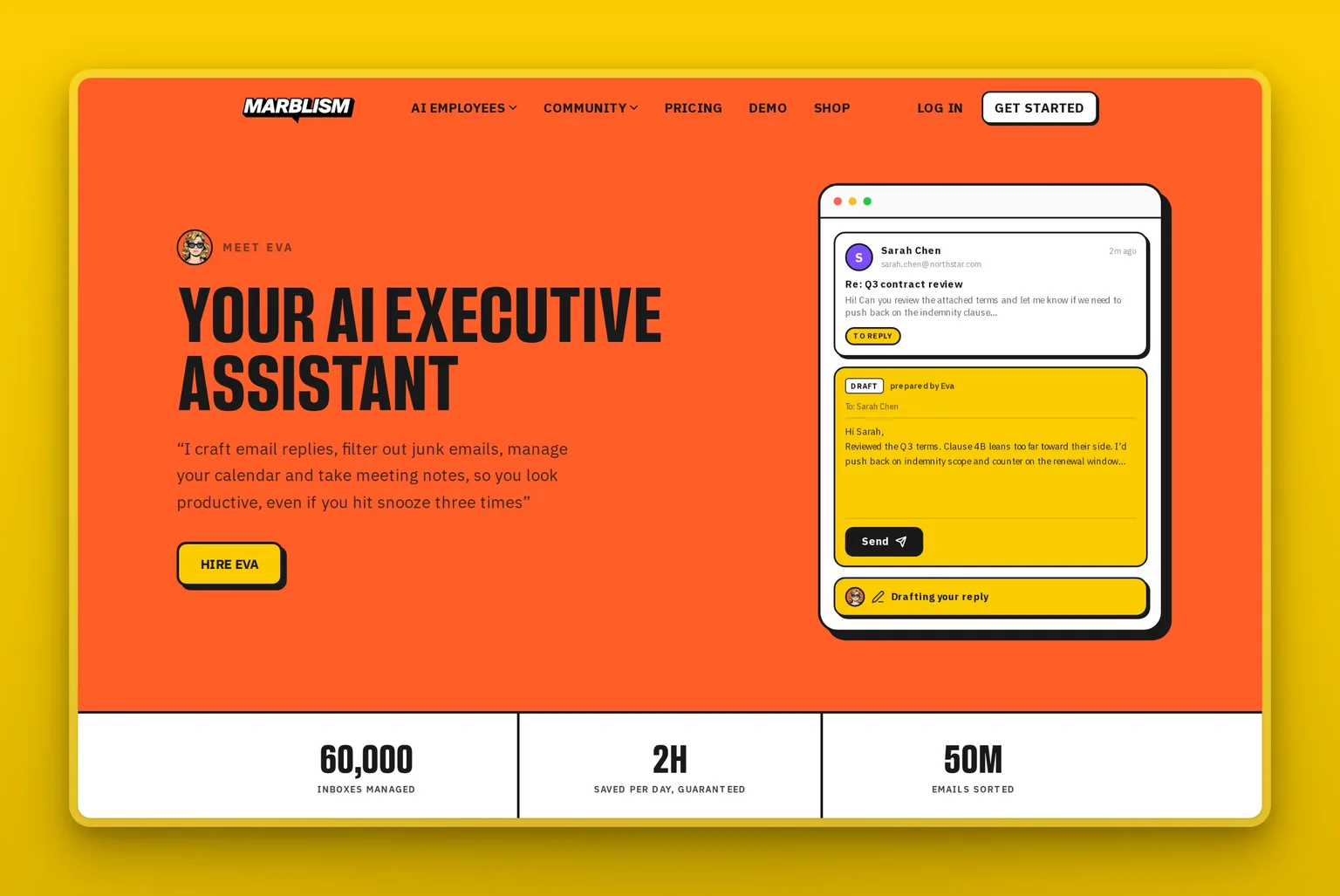
Map Eva, Marblism's AI Executive Assistant, onto the four piles and she covers the bottom two. Noise gets filed without you. Routine comes back as a draft in your voice, and the meeting that falls out of it gets booked against your real availability. She works in Gmail, Outlook, or any IMAP mailbox, and joins calls to take the notes.
What she does not do is decide the top two piles for you, and the approval step is where that line is drawn: no reply leaves in your name until you have read it. That protects the Routine pile from a confident wrong draft.
It does not protect you from the filing problem, and no approval step could, because filing happens on the way in. The habit that covers it is a weekly look at what got filed, whatever tool you use.
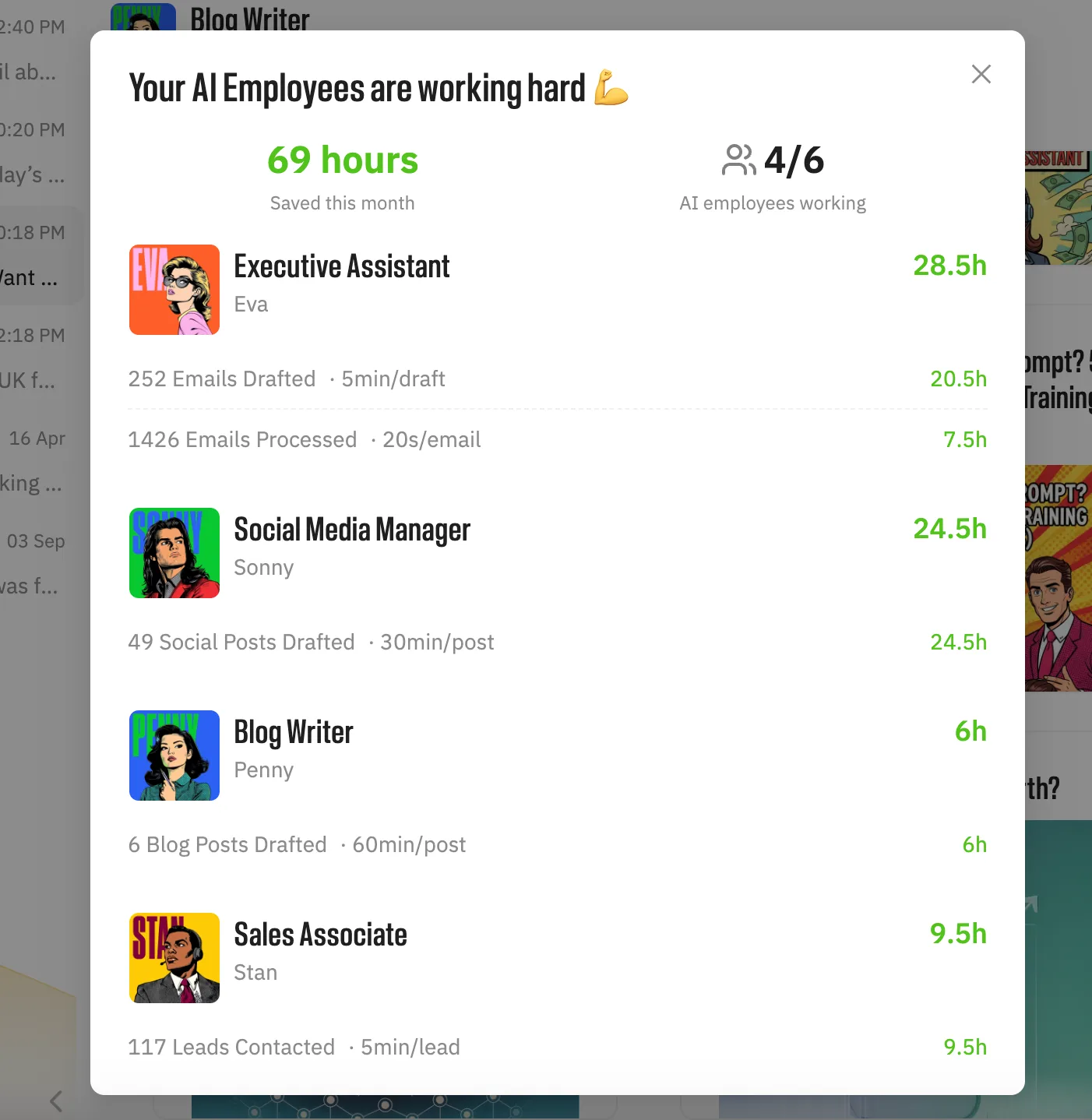
She is one of six AI Employees included on every plan from $24 a month, with a 7-day money-back guarantee rather than a free trial.
Here is Eva working an inbox, if you would rather watch it than read about it.
Marblism is rated 4.8 out of 5 on Trustpilot. One owner running Eva alongside the rest of the team described the handover plainly:
"So far the Marblism team is working out well. Eva, the Executive Assistant is taking care of my inbox, scheduling and communicating with the rest of the team..."
Jeffrey Jackson, from his verified Trustpilot review
If you want to compare the field before deciding, our roundup of the best AI executive assistants goes tool by tool, and our walkthrough of reaching Inbox Zero in about ten minutes a day covers the daily routine once one is running.
Frequently asked questions
Both options, defined
What is an email management virtual assistant?
An email management virtual assistant is a remote person hired to run your inbox: triaging what arrives, flagging what needs you, drafting replies, unsubscribing you from noise, and keeping the whole thing to a system the two of you agree. Most work part-time rather than full-time. The task list is the same one an AI email assistant handles, and the difference is that a person also brings judgment about which messages matter and why.
Can AI replace a virtual assistant for email?
AI can take over roughly a third of the email work a virtual assistant does, and not the rest. A randomized study of 7,137 workers published by the NBER measured a 31 percent drop in email time for the people who used it in most weeks, against a baseline of 11.7 hours a week.
That share is filing, summarizing, drafting the replies you have written before, and scheduling. What stays out of reach is reading tone, working one problem across several people at once, and deciding what to do about a message with no precedent. Owners who cut the person entirely tend to absorb that remainder themselves.
Should I use AI or a VA if I get 100 or more emails a day?
Start with AI at that volume, then measure what is left. Most of a hundred-message day is noise and repeat questions, and paying a person to sort it by hand is an expensive use of a person.
Give the software two weeks to learn your patterns, then look honestly at what still reaches you. If the remainder is mostly relationship and judgment work and it is still eating your week, buy a few hours of a human for that remainder rather than switching back.
Cost and choosing
Is an AI email tool cheaper than hiring a virtual EA?
An AI email tool costs about $288 a year against roughly $18,000 for a part-time virtual executive assistant at $1,500 a month, so on price it is not close.
The comparison only holds for the repeatable part of the work. A tool does not read tone, chase three people through a problem, or take responsibility for a decision, so for most owners the real question is not which one to buy but how many hours of a person you still need once software is carrying the volume.
How much should you pay a virtual assistant to manage your inbox?
Buy hours rather than a retainer if the inbox is all you are delegating. Four to six hours a week is usually enough to cover the judgment-heavy messages once software is handling volume, which at the $35.61 average US freelance rate Project Untethered recorded lands somewhere near $600 to $900 a month, rather than the $1,200 to $3,000 a full part-time agency arrangement costs.
The rate ladder across every hiring model, from offshore to in-house, is in our breakdown of how much a virtual assistant actually costs. The warning sign is paying a full part-time retainer while most of the work being done is filing and standard replies.
Which AI tool is best for email management?
Pick by the pile that is costing you time, because these tools do genuinely different jobs. Shortwave makes you faster inside Gmail specifically, and Superhuman does the same across Gmail or Outlook, so skip both unless you live in one of those and your volume is high, and expect to still be the one writing.
SaneBox does one thing well, keeping unimportant mail out of sight across any provider, so skip it if your problem is writing replies rather than the sheer count of them. Marblism's Eva takes the role instead of a task, covering inbox, calendar, notes, and follow-ups on one plan, which is the wrong buy if your bottleneck is a single job or if you would rather direct each task than approve finished work.
Is it safe to give an AI assistant access to my inbox?
Safety depends on which pile it is touching. Letting software file and answer Noise and Routine on its own is low-stakes: the worst case is a newsletter filed wrong.
Relationship and Risk are where a mistake actually costs you, so that is where two questions matter before you connect anything. Does the vendor train models on your content, and is that answer written into a data processing agreement rather than a marketing page? And does it act on its own, or ask first? Keep the approval step on anything that could reach a client, and watch a new assistant for a few weeks before trusting it with the piles that carry real risk.