How to Start a Business With AI Employees

Ulric Musset
CEO, Marblism
30 de julio de 2026

To start a business with AI, prove someone will pay, plan and brand it, then hand your website, marketing, sales, reception, and books to AI before you touch payroll.
Starting a company used to begin with raising money so you could hire the people who would do the work: someone to build the site, someone to chase the leads, someone to answer the phone.
It no longer has to: AI now covers the roles that used to require that first payroll. You can validate the idea, build the product, launch the site, and answer the phone before you pay a single salary, because the roles you used to hire for now have capable AI standing in. Jodie Cook, writing in Forbes, makes the same argument: you can now run the roles you cannot yet pay a salary for without filling them.
I compared the tools founders actually reach for at this stage, from general assistants like ChatGPT to dedicated sales, reception, and bookkeeping tools, and my honest read is that the decision that matters is which job you hand off first, not which chatbot you pick. Almost none of the overhead a traditional first hire brings, the payroll taxes, the benefits, the management time, is required before your first customer shows up.
TL;DR
Starting a business with AI is a sequence, not a shopping list, and the order does the work: validation before branding, branding before a site, a site before you spend a cent on outreach. Get that backwards and you are paying to send strangers to a page nobody asked for.
From there you either run a stack of single-purpose tools yourself, one for the site, one for outreach, one for the phone, or hand those roles to a done-for-you AI team like Marblism, which covers the assistant, sales, reception, and social on one bill and checks with you before anything goes out. The catch is the same for every tool: the split I keep coming back to is that AI does roughly 70% of the work, and the founder still owns the 30% that decides whether it succeeds.
Key takeaways
| Step | What AI does |
|---|---|
| 1. Prove someone will pay | Pressure-test the idea and draft the plan before you build anything |
| 2. Plan and brand it | Turn the idea into a one-page plan, a name, and a logo |
| 3. Hand off the jobs you'd hire for | Fill the website, marketing, sales, reception, and books, with AI instead of a salary |
| 4. Launch | Get in front of real prospects and take the first payment |
| 5. Measure, then add a role | Check what AI is buying back before you hand off the next job |
What starting a business with AI actually means in 2026
Starting a business with AI means using it to do the jobs you would otherwise hire for, not just to write the occasional email. The shift over the past two years is from AI as a tool you operate to AI that holds a role, what's now commonly called an AI employee.
A tool, like the blank ChatGPT box, waits for you to type a prompt and does nothing until you do. A role, an assistant, a marketer, a receptionist, is responsible for a result and keeps working while you do something else.
Running solo is already the norm: the U.S. Census Bureau counts 29.8 million nonemployer businesses, generating $1.7 trillion, about 6.8% of the U.S. economy. AI is what turns that from a constraint into a choice, because the jobs that used to force a first hire can now be covered for the price of a subscription.
The rule of thumb I use is that AI does roughly 70% of that work, and the other 30% is where things go wrong if nobody checks. It drafts the plan, but it cannot tell you the plan is wrong. It writes the cold email, but it does not know which prospect is worth your afternoon.
If AI does the work that used to take a dozen hires, someone still has to check that work is actually right, and that job is yours now. Treat AI as the team, and treat yourself as the person who brings the problem, the judgment, and the final check.
One scoping note before the steps: this guide is written for service businesses, consulting, events, trades, agencies, professional services, where the recurring jobs are the inbox, the phone, outreach, and content. If you sell a physical product the sequence still holds, but sourcing, inventory, and storefront tooling sit outside what this covers.
One founder, five jobs: the real problem
The reason this matters is that a solo founder is not doing one job: the website, marketing, sales, reception, and books all land on the same person at once. You are the product, the salesperson, the support desk, the bookkeeper, and the person who answers the phone, usually in the same hour. The deeper fear behind it is simple: a solo business has no backup. Get sick or take a week off, and nothing moves until you are back at your desk.

Hiring is supposed to fix this, but for a new business it often cannot: the BLS puts benefits at 30.1% of what employers spend on private-industry workers, which puts a hire's real cost near 1.4 times the salary you quote, and for a first hire that is often more than a young business clears in a month. The hire is risky too: a bad first hire can cost you more time than it saves, correcting work instead of moving your own forward.
"Hiring humans meant scheduling nightmares. Training cycles. Sick days. The overhead was crushing my ability to scale."
Veronica, founder of AdminiFy 360, in her Marblism customer story
She now runs five businesses with a team of five AI employees covering the inbox, the phone, social, outreach, and content, and puts the saving at more than 30 hours a month.
AI changes the math because you can hand off a role for the price of a subscription, keep approval over the output, and add the human hire later, once the work and the revenue justify it. The opportunity is not which app is cool, it is which of your jobs you can responsibly stop doing yourself.
How to start a business with AI, step by step
The order of the five steps matters more than any single tool in them, because building before you validate is the most common way founders waste the head start AI gives them.
The steps are also not five separate projects. Each one hands something to the next: the wording that wins your first yes becomes the copy on your site, the site's booking page becomes what your receptionist books into and what your outreach links to, and the calls that page produces tell you which line of the copy to change. To keep this concrete: a one-person cleaning service for small offices, from idea to first booked job.
1. Prove someone will pay first
Choose a problem you have dealt with firsthand, then use AI to find out whether anyone else will pay to be rid of it, before you write a line of code or design a logo. ChatGPT or Anthropic's Claude can map the market, list competitors, name the objections a buyer would raise, and draft three versions of a landing page that promises the fix. ChatGPT is free to start with paid plans from $8 a month, and Claude has a free tier of its own.
Then do the part AI cannot: show that page to real prospects and see who actually hands over money, a deposit, a pre-order, or a booked call, not just a compliment. For the cleaning service, that means putting a real book-a-call link in front of twenty local office managers, not asking friends whether it sounds like a good idea.
Interest is not demand: a compliment never hands over a deposit. Steve Blank, who has taught the lean startup method at Stanford for decades, still tells founders to get outside and talk to real potential customers before building anything. He treats AI as a force multiplier for that work rather than a replacement for it. What AI made cheap is the building, and finding the right problem and the first paying customers still costs what it always did.
The exact wording that earned a yes becomes your homepage headline, instead of something you invent later. The list of objections buyers actually raised becomes your pricing page, your FAQ, and the answers your receptionist gives once the phone starts ringing. Write both down while they are fresh, because the next four steps run on them.
2. Plan and brand it with AI
Once the idea survives contact with real buyers, use AI to produce the assets a business needs to look legitimate. Feed the same general AI the winning wording and the objection list from step 1, and it turns them into a one-page plan and a pricing model that answer what buyers actually pushed back on. This is the step the U.S. Small Business Administration itself now points owners toward, in guidance that is notably cautious: AI can help a small business do more with less, and its own advice is to start small.
Canva's Magic Studio then turns the name into a logo, a color and type set, and the first social and ad graphics, free to start and around $180 a year for Pro. Save that as a brand kit rather than as loose files. The website builder, the social posts, and the invoices all pull from it in the next step, which is what makes the cleaning service look like one company across all three instead of three different ones.
Keep the plan to one page. It exists to clarify your thinking and, if you need it, to open a bank account, not to win a prize.
3. Cover the five jobs before you can afford a salary
This is the step that actually changes your week: five recurring jobs, the website, marketing, sales, reception, and the books, move off your to-do list and onto AI's. Hiring for all five is a payroll a pre-revenue business cannot carry. Handing them to AI costs a stack of subscriptions instead, and the roles run whether or not you are at your desk.
Treat the five roles as one system rather than five separate purchases. Build the site first, because it is where every other role points: it holds the booking page the receptionist fills, the link the outreach sends, and the form that drops a new lead into your inbox. Handing off a role means connecting it to that same page.
Website: an AI builder gets you online in minutes
Durable answers a handful of questions and returns a working business site, copy and images included, in under a minute, which suits a solo owner who needs an address customers can reach today rather than a bespoke design. Paste in the headline that won your first yes and load the Canva brand kit, and what comes back stops reading like a template. It bundles invoicing and a light CRM too.
Free to start, with Launch at $22 a month; Durable holds a 4.7 out of 5 rating on Trustpilot, where Skip Martin wrote: "If you are thinking about putting up a website you don't need to go any further than Durable. It uses AI to assist in its creation which allows you to do it yourself." If you are launching a real catalog and checkout, a dedicated store builder like Shopify Magic goes deeper.
Build one booking page before you move on. It is the single destination the other roles share, so the receptionist books into it, the outreach emails link to it, and the social posts point at it, and every channel ends up producing the same kind of appointment on the same calendar.
Marketing: the brand and the posts that keep it visible
Canva covers the one-off assets (logo, deck, ad graphics), free to start with Pro around $180 a year, a 4.7 out of 5 rating on G2. What it does not do is keep posting once the launch graphics are made.
That is the job Sonny and Penny hold inside Marblism: Sonny runs the social accounts and Penny writes the SEO content, both learning your voice and checking with you before anything publishes, so the marketing role keeps running after the first week instead of going quiet. They work from the same two inputs the rest of the stack uses, the brand kit from step 2 and the booking page on your site, which is what keeps a post about office cleaning ending at a bookable slot rather than at a dead end.
A dedicated AI social scheduler like Buffer does the same posting-cadence job alone, free to start and from about $5 a month per channel, a 4.3 out of 5 rating on G2, if social is the only piece you want to hand off.
Sales: outreach that runs whether or not you are at your desk
Inside Marblism, Stan finds leads and sends cold email and LinkedIn outreach from your own accounts, so a new lead gets a first touch the same day instead of waiting on your calendar. For the cleaning service, that is a list of office managers within a few miles, sent the same booking link the site and the social posts already use. A dedicated AI outreach tool like Instantly does the sales role alone, from $47 a month, a 4.8 out of 5 rating on G2, if outreach is the only piece you want to hand off.
Either way, Zapier is the wiring between the roles rather than a role itself: the site form creates a contact, the booked call lands on your calendar, and the finished job opens a draft invoice, with nothing retyped between them. It is free for 100 tasks a month and about $20 a month above that, a 4.5 out of 5 rating on G2. Technical founders who want to own that layer themselves often prefer n8n, which is code-flexible and self-hostable.
Reception: the phone and the calls that follow it
Missing a call is usually a lost customer, and Rachel is built to answer and book on her own phone number so that stops happening. Point that number at the booking page you just built, and someone who saw a post at 9pm gets a real slot instead of a voicemail. Eva holds the other half of the same job, the inbox and calendar that booking lands in, so the confirmation and the reschedule do not come back to you.
If your calls are mostly sales and discovery meetings rather than an inbound phone line, Fathom records and summarizes them instead, free with unlimited recordings and instant AI call summaries, Premium at $16 a month, a 5.0 out of 5 rating on G2. Those summaries are worth more than a record: the objection that keeps coming up on calls is the line to change on the page you built in step 1.
A dedicated AI receptionist like Rosie does the phone role alone, from $49 a month, if that is the only piece you want to hand off.
Books: the one role no AI team fully removes
Someone still has to keep the books clean for tax time and cash-flow decisions, and getting that wrong is expensive. QuickBooks Online is where most small businesses put it, with its built-in AI, Intuit Intelligence, sorting transactions, drafting invoices, and flagging anomalies. It starts at about $38 a month for Simple Start, a 4.0 out of 5 rating on G2. Marblism does not do accounting, so QuickBooks or a bookkeeper stays on the list either way, whichever path you choose for the other four roles.
The booked job becomes an invoice, the invoice becomes a paid transaction, and that transaction is what tells you in step 5 whether the role you handed off is paying for itself.
Shortcut: hand the recurring roles to one team on one bill
If the honest problem is that every role lands on you at once, running four single-purpose tools just means four bills and four logins instead of one job. That is the gap Marblism is built for: one subscription that covers the marketing, sales, and reception roles, plus the inbox. It does not build the website or do the books, so Durable and QuickBooks stay on the list either way.
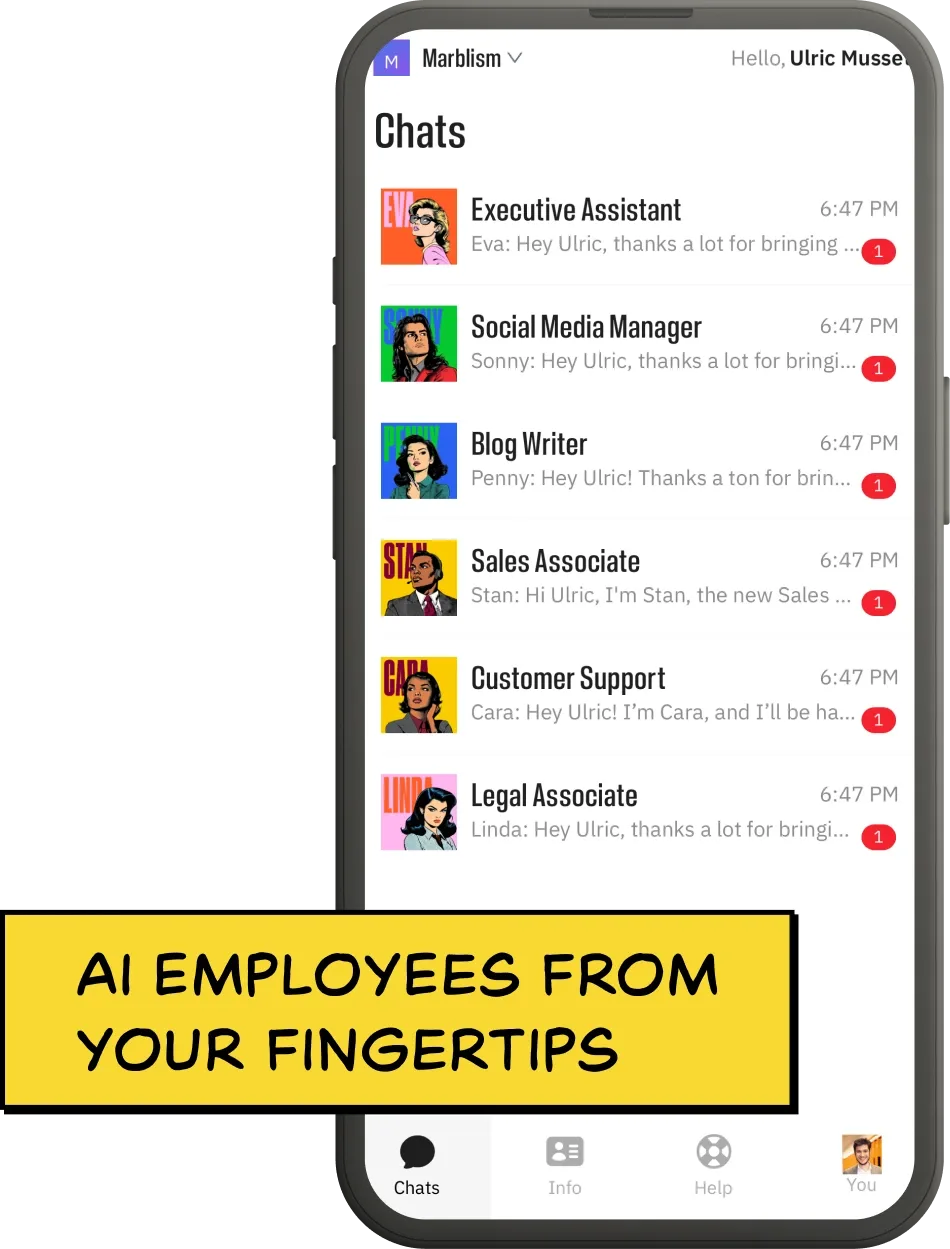
Eva runs your inbox, calendar, and scheduling, Stan finds and emails leads, Rachel answers and books your calls, and Sonny and Penny keep the social accounts and content posting. Because they share one workspace, the lead Stan emails and the caller Rachel books arrive on the calendar Eva already manages, which is the handoff you would otherwise wire together yourself. Nothing sends, posts, books, or signs without your approval, so you keep the final say while the routine work runs itself.
Key Features
- One login and one bill for the whole team, not a separate subscription per function
- Rachel gets her own phone number, and Stan sends from your own email and LinkedIn accounts
- Everything Sonny, Penny, Stan, Rachel, and Eva produce routes through the same one-approval queue, not a separate app or login
Pros
- Fills several first-hire roles at once, not one job
- Flat price covers all six Employees, not a bill per function
- Nothing sends, posts, books, or signs until you approve it
Cons
- Not the deepest specialist in any single role a dedicated tool owns
- More than you need if only one job is occasionally painful
- It is not accounting software, so you still pair it with a bookkeeping tool
Pricing
Every plan includes all six AI Employees and differs only by billing frequency. Marblism is $24 a month on annual billing, $33 billed quarterly, or $44 monthly, with a 7-day money-back guarantee rather than a free trial. The company reports serving more than 40,000 businesses.
User Reviews
Marblism is rated 4.8 out of 5 on Trustpilot.
"What really sets Marblism apart is that it feels like having a real, capable team… without the overhead."
Tracey G Jackson, Ph.D., reviewing Marblism on Trustpilot
Pick it if you are covering the phone, inbox, outreach, and admin alone, and your real bottleneck is everything landing at once. If your problem is one specific job, or you want to steer every task yourself rather than approve finished work, a dedicated tool built for that single task will go deeper.
4. Launch and get your first customers
The site is live, and the roles are covered. Launching means pointing all of them at one place: the booking page. Send it to the prospects who already said they would pay, put it in the posts Sonny and Penny draft, and let Stan's outreach carry the same link, so a filling calendar becomes the one number that tells you the launch worked.
AI can build the funnel and keep it running, but it cannot decide which ten prospects are worth a personal call this week. Spend that judgment where it matters most: on the first customers who will tell other people about you.
5. Measure what AI bought back, then hand off the next role
A month in, judge each role you handed off by one question: are you getting your time back, and is the work still good enough to put your name on. Because the roles feed each other, the chain answers it without a spreadsheet: compare calls answered against calls booked, then booked jobs against invoices paid. For the cleaning service, a week of answered calls and no new invoices says the phone role is working and the offer is not.
If a role is running clean without you, hand off the next one, drawing from the wider set of AI tools for small businesses once the launch stack is covered. If the output needs constant correction, tighten your approval step before you add anything else. This is also where AI's honest limits start to matter, because the roles that hurt customers when they go wrong are exactly the ones that need the closest watching early on.
Which role to hand off first
Hand off the job that is costing you the most right now, not the one that is easiest to automate. A missed call is usually a lost customer, while a late email usually is not, so the phone tends to beat the inbox if both are slipping. Name the job that most often keeps you from doing the work only you can do, and hand that one off first.
David Alex, a creator who partners with Marblism, runs his own business on six AI employees and walks through the setup role by role, which is the same sequence step 3 lays out.
One AI team vs. a stack of subscriptions
The real cost of starting with AI is not the sticker price of any one tool, it is the total of the stack once you cover every role. Single-purpose tools each solve one job well, and the bills add up quietly.
An outreach tool like Instantly runs $47 to $97 a month, an AI receptionist like Rosie $49 to $149, a scheduler like Calendly $10 to $16 per seat billed yearly, and a social tool like Buffer $5 to $10 a month per channel. Add them and a modest role-by-role stack lands between roughly $111 and $272 a month before you have made a sale, and higher again once you pay for an automation layer on top.
| Role to cover | Separate-tools path | One-team path |
|---|---|---|
| Inbox and scheduling | A separate AI assistant tool | All covered by Marblism, $24 to $44/mo for the whole team |
| Lead outreach | A separate sales tool | |
| Phone answering | A separate AI receptionist | |
| Social and content | Separate social and writing tools | |
| Rough monthly total | Roughly $111 to $272, several bills | $24 to $44, one bill |
This is the case for a done-for-you team when several roles need filling. That is $111 to $272 a month in separate tools, against $24 to $44 for the same set of roles on one bill: for the price of a single subscription, Marblism covers the assistant, sales, reception, and social together, and you manage one login instead of four. The honest exception is the books: Marblism does not do accounting, so a bookkeeping tool like QuickBooks stays on the list either way.
The decision is not team good, tools bad. It is how many roles you actually need covered. One painful job means one dedicated tool. Four painful jobs at once usually means a team costs less and takes less of your attention.
Every tool at a glance
| Tool | Role it fills | Entry price | Best for |
|---|---|---|---|
| ChatGPT | Validate and plan | Free, paid from $8/mo | Research, planning, writing |
| Canva | Brand and design | Free, Pro $180/yr | Logo and launch assets |
| Durable | Website builder | Free, Launch $22/mo | A fast service-business site |
| QuickBooks | Bookkeeping | From $38/mo | Keeping the books tax-ready |
| Zapier | Automation glue | Free, paid from $20/mo | Connecting your tools |
| Fathom | Call notes | Free, Premium $16/mo | Founders on sales calls |
| Marblism | The whole team | No free tier, from $24/mo | Several roles at once |
What AI still cannot do when you start a business
AI can cover most of the work, but a few jobs still belong to you and to licensed humans, and getting that line wrong is where new founders get hurt. Knowing these limits, from what AI cannot file to what it cannot verify or sell, is what keeps a confident wrong answer from becoming a tax penalty or a lost customer.
It cannot form the company, file the taxes, or open the bank account for you. The paperwork that makes a business real, choosing an entity like an LLC, registering it with your state, getting an EIN from the IRS, and opening a business bank account, still runs through you. Use AI to understand the options and prepare the questions, then have a real accountant or attorney handle anything with legal or tax consequences.
It cannot tell you the output is wrong. AI writes confidently whether it is right or not, and it will invent facts, citations, and numbers. An invented statistic in a proposal, a competitor's price quoted wrongly on your own pricing page, or a refund window promised in a customer email that your terms do not offer all read as authoritative on the way out. Verify anything that touches money, law, or a customer promise before it goes out.
It cannot supply taste or judgment. When anyone can generate a logo, a page, or a plan, the value moves to knowing which version is right, and work that is recognisably machine-made now signals to a customer that nobody cared enough to finish it. Your job is to be the editor, not just the prompter.
It cannot find the customer for you. AI lowers the cost of building to near zero, which means building is no longer what sets you apart. Getting the first hundred paying customers still takes your judgment about who to reach and what to promise. Treat AI as the team, and yourself as the one deciding where to point it.
Frequently asked questions
Starting a business with AI, and what it costs
Can you start a business with only AI?
You can start and run most of a business with AI, but not all of it alone. AI can validate your idea, build your brand and website, write your content, answer your calls, and chase your leads. What it cannot do is form the company, file your taxes, make the final call on a risky decision, or care whether the output is actually good. The realistic model is AI doing the bulk of the work while you supply the problem, the judgment, and the approval on everything that reaches a customer.
How do I use AI to make money starting a business?
Use AI to run a business you sell to real customers, not to sell AI itself. Pick a role you would otherwise pay a salary for, the assistant, the salesperson, the receptionist, the marketer, and hand it to AI at a fraction of that cost, so more of every sale stays as profit while you are still small. The money comes from the business you build, not from the AI underneath it.
How much does it cost to start a business using AI?
You can start for well under $100 a month if you lean on free tiers and add paid tools only as you need them. A general AI starts at $8 a month, a website builder like Durable runs $22 a month, bookkeeping software runs from about $38 a month, and a design tool like Canva is billed yearly, at $180 a year for Pro.
The bigger cost is covering the recurring roles: a stack of separate tools for the inbox, outreach, and phone can reach the low hundreds a month, while a combined AI team like Marblism starts at $24 a month for all of it. Start cheap, and add a paid role only when it clearly buys back your time.
Choosing tools, and the limits and legality of AI
Can AI replace employees, and can one person run a business with AI?
AI can fill the roles you would otherwise make your first hires, so one person can run what used to take a small team. It handles the assistant, sales, reception, social, and content work well, at a fraction of a salary. It does not replace the human judgment behind those roles, or specialist licensed work like law and accounting. The strongest setup is a solo founder who hands the routine roles to AI, keeps approval over the output, and adds human hires later, once the revenue justifies them.
What is the best AI tool to start a business?
No single tool is best, because the right first purchase depends on which role is costing you the most. A general AI like ChatGPT or Claude validates the idea and drafts the plan, Canva builds the brand, an AI website builder like Durable gets you online, and QuickBooks keeps the books.
Then decide how to cover the recurring roles: if only one job hurts, a dedicated tool is enough. If the inbox, the phone, and the follow-ups all land on you at once, a combined AI team like Marblism usually costs less than buying four separate tools for the same roles, because one subscription covers them together.
Is it legal to run a business with AI?
Yes, using AI to run your business is legal, and most tasks carry no special rules. What matters is disclosure and accountability, not permission. Check the terms of each tool, disclose AI use where a customer would reasonably expect a human, protect any customer data you feed in, and keep a person accountable for regulated work like contracts, tax, and health or financial advice. AI is a tool your business uses, and the liability for a wrong price, a bad contract term, or a misleading claim stays with you.
Can AI write my business plan?
AI can write a solid first draft of a business plan in minutes, including the market summary, pricing, and financial projections, from a few paragraphs about your idea. Check every number, test the assumptions rigorously against real prospects, and rewrite the parts that reflect your actual strategy. A plan is useful because it clarifies your thinking, and that only happens if you edit it rather than accept it.
About Marblism
What is Marblism?
Marblism is an AI Employees platform for small businesses: a team of six named AI workers on one subscription that run whole functions and check with you before acting. Eva handles your inbox, calendar, and scheduling, Stan finds and emails leads, Rachel answers and books your calls, Sonny runs your social media, Penny writes SEO content, and Linda drafts and reviews contracts, though she is a drafting aid rather than a substitute for a lawyer on anything binding.
Each one learns your business and voice, works around the clock, and waits for your approval before anything sends, posts, or signs. It is built for the solo owner who cannot yet afford a full-time assistant, salesperson, or receptionist and wants to hand those roles to a $24-a-month AI Employee instead.
How much does Marblism cost?
Marblism costs $24 a month on annual billing, $33 billed quarterly, or $44 month to month, and every plan includes all six AI Employees. There is no free trial; instead there is a 7-day money-back guarantee, so you can try it and get a full refund if it is not for you. Because one plan covers the assistant, sales, reception, social, and content roles, it usually costs less than buying a separate tool for each.