What Is an AI Employee? What It Actually Does

Ulric Musset · CEO, Marblism

Software that owns a complete job, not just a single task, is what actually defines an AI employee. It works on its own schedule instead of waiting for you to prompt it. It handles the inbox, the calls, the follow-ups or the posting end to end, checking in only for approval. That is a description of scope, not of any specific technology.
No chip, no model and no architecture makes something an AI employee. A vendor sticks the label on once its software owns enough of a job to feel like a hire, and they disagree wildly about how much is enough.
Do not ask whether the thing in front of you counts as an AI employee. Ask how much of the job it actually owns, and who is on the hook when it drops something.
Federal wage data puts a real number on the human version of this job, and I have costed it out below rather than repeat a vendor comparison chart.
My take: a vendor's own fine print is almost always more honest than its marketing, and in this category the distance between the two is unusually wide.
Short version
Ownership runs on a five-rung ladder, from tools you prompt up to software that owns a whole role. Where a product sits on it decides whether it is real, what it costs you and how it will fail you. Judge what you are looking at by where it actually sits, not by what its pricing page calls it, because right now every rung is being sold as an AI employee.
| Level | What it owns | Who starts the work | What is still on you | What you will see it called |
|---|---|---|---|---|
| 1. Prompted tool | One output at a time | You, every time | Remembering to open it, and putting the result where it belongs | AI assistant, chatbot |
| 2. Embedded feature | One step inside an app you already run | You, from inside the app | Everything outside that one app | Copilot, smart replies |
| 3. Workflow you build | A defined sequence, exactly as configured | A trigger you set up | Rebuilding it every time the business changes | AI agent, automation builder |
| 4. Agent with judgment | A multi-step task, choosing its own steps | A goal you hand it | Setting the goal, and checking the steps it chose | Autonomous agent |
| 5. Role owner | A whole job, continuously | Nobody, it runs on its own | Approving what goes out, and the judgment calls | AI employee, digital worker |
Contents
- What is an AI employee?
- How does an AI employee work?
- AI employee vs AI agent vs AI assistant
- What AI employees actually do
- Benefits of AI employees for small businesses
- How much does an AI employee cost?
- Where AI employees still fall short
- Is your business ready for an AI employee?
- How to start with an AI employee
- Frequently asked questions
What is an AI employee?
An AI employee, also sold as a digital worker, an AI worker or AI staff, is software assigned to a named role and left to run that role without being asked. It gets standing access to the systems that role touches: the inbox, the calendar, the CRM, the phone line, the social accounts. In practice three things separate it from the AI tools you have already used.
It starts work on its own
A prompted tool is idle until you open it. An AI employee is triggered by the world instead: an email lands, a call comes in, a lead goes cold, Tuesday arrives. This is the single clearest test, and it is the one most products fail. If nothing happens when you close the laptop, you are looking at a tool.
It keeps context between jobs
It remembers your pricing, your tone, who your important clients are and what you decided last month, so you are not re-explaining your business on every task. That accumulated context is what makes the output stop reading as generic.
It answers for the result
Ask what it is measured on. A tool is measured on whether it produced the thing you asked for; an AI employee is measured on whether the inbox is actually clear on Friday. That shift is what makes the hiring vocabulary stick, because a job you can be held to is a job someone can be answerable for.
Those three properties are why the category picked up the vocabulary of hiring. You will also see the same idea sold, interchangeably, as a digital worker, a digital employee, an AI worker or an AI coworker. The words are chosen by whoever is selling, and none of them tells you where on the ladder the product sits.
How does an AI employee work?
Nothing above tells you what actually happens between an email arriving and a draft being ready, and that gap is where most of the scepticism lives. The mechanism is less exotic than the marketing suggests: standing access, an event that wakes it up, your written-down context, and a hard stop before anything leaves the building.
What it connects to
A role owner is useless without access to the systems its job lives in, which is the part you set up on day one. For desk roles that means your email and calendar: Gmail, Outlook or any IMAP provider, with Google or Outlook Calendar. Meeting notes mean sitting in on Google Meet, Zoom or Teams calls. A receptionist role needs your phone number pointed at it, and a social role needs the accounts themselves connected: Instagram, LinkedIn, X, Facebook.
If a job touches a system you cannot connect, that job cannot be handed over yet. That is the first thing worth checking against your own stack, before any of the rest of this matters.
What wakes it up
This is the difference that matters. Nobody presses go. Something happens in one of those connected systems and the role starts on its own: an email lands, a call rings, a form is submitted, a lead has been quiet for six days, or it is simply Tuesday morning and the posting schedule says so. That is why the work carries on when your laptop is shut, and it is also why a silent failure is possible at all, because nothing waits for you to notice.
What happens in between
Once it wakes up, the sequence is roughly the same whatever the role. It reads the new thing, checks it against the context you wrote down (your pricing, your tone, who matters, what you decided last time), works out whether this is in its lane, and drafts the response or takes the step. That stored context is doing the heavy lifting. It is the reason the second month is better than the first, and the reason a role you never briefed properly keeps producing output that sounds like nobody who works for you.
Where it stops
Then it hits the approval boundary and waits. A draft sits in your inbox, a post sits in a queue, a contract sits marked up. You click send, or you do not. Everything the role did is logged either way, which is what lets you check on Friday that the follow-ups actually went out. That boundary is the whole safety model, and any product that quietly removes it is selling you something riskier than it sounds.
AI employee vs AI agent vs AI assistant
These three terms get used as synonyms constantly, including by vendors who should know better. They describe different amounts of ownership, and that is what you are actually choosing between.
| AI assistant | AI agent | AI employee | |
|---|---|---|---|
| Scope | One task you asked for | One goal, multiple steps | An ongoing role |
| Who starts it | You | You, once per goal | Events, on a schedule |
| Memory | Usually per session | Per run | Persistent business context |
| Setup | None | You configure it | You onboard it, then approve |
| When it fails | You notice immediately | The run stops | Work quietly goes undone |
The more a system owns, the longer a failure can hide. That is why an honest AI employee keeps a human approval step on anything irreversible: sending an email, publishing a post, signing a document, making an outbound call.
How this differs from the AI tools you already pay for
You are probably not choosing between three empty categories. You already pay for something: ChatGPT, the AI built into your email or your CRM, a writing tool, maybe a chatbot on your site. The question I would actually ask is what a role owner does that the things already on your bill do not. Find them on the ladder above and read across to the fourth column.
Notice that none of this is about output quality. Ask ChatGPT for one email and it will often write a better one than a role owner would. What it will not do is notice the email needed writing. Every rung below the top waits for you to show up, which is how you end up paying for a stack of good tools and still doing the same amount of remembering.
Here is the test I would run on your own stack. If your tools sit unused because you forget to open them, that is an ownership gap, and this tier closes it. If you are in them every day and just wish the output were better, you have a quality problem instead, and no amount of ownership fixes that.
Is an AI employee just an agent with a name?
An AI employee is largely an agent underneath, and it is fair to be cynical about the renaming. Most role-based products are built on the same underlying technology, and the different name is a marketing choice.
What is not just positioning is the packaging around it: a pre-configured role, standing access to your systems, persistent context and a defined approval boundary. A raw agent leaves all four of those to you. Whether that packaging is worth paying for depends entirely on whether you were ever going to do the configuring yourself.
Which one does your business need?
The tier that fits depends entirely on who is going to run it day to day. If you have the time and appetite to wire up your own tools, an agent or a workflow builder gives you the most control for the least money.
If you want a job to simply be handled and you are the one who would otherwise do it at 11pm, the role-owner tier is the one worth paying for. The setup and the ongoing supervision are the parts it takes off your plate. Buying higher up the ladder than you need means paying for autonomy you will not use.
If the agent tier is where you land, start with the Grok Bot alternatives. It goes from free self-hosted agents to cloud ones at $20 a month.
What AI employees actually do
The jobs you hand over first are the ones that repeat constantly, run on rules you could write down, and hurt to drop. In practice that lands on six roles.
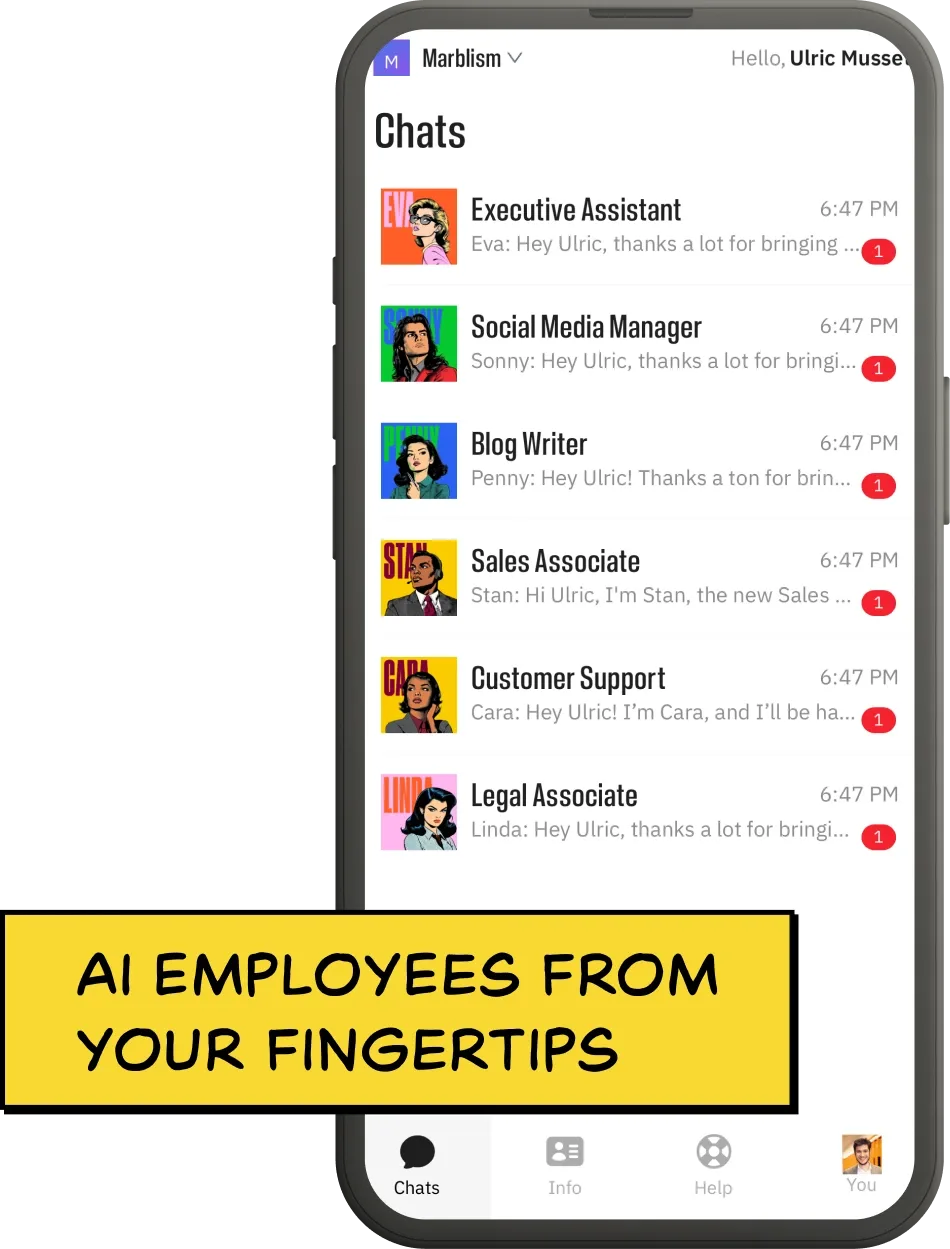
| Role | Marblism employee | What it owns end to end | What still needs you |
|---|---|---|---|
| Executive assistant | Eva | Sorting the inbox, drafting replies, booking meetings, taking meeting notes | Approving anything before it sends |
| Receptionist | Rachel | Answering calls, qualifying, booking, transferring the urgent ones | Anything emotionally loaded |
| Sales agent | Stan | Finding leads, sending outreach, chasing follow-ups, booking calls | The actual selling conversation |
| Social media manager | Sonny | Planning, writing, scheduling and posting to each platform | Judgment on anything sensitive |
| Content writer | Penny | Keyword research, drafting, publishing on a schedule | Fact-checking claims about your business |
| Legal assistant | Linda | Drafting standard agreements, flagging risky clauses, explaining terms | A lawyer, on anything that matters |
Not one of these six is a clean handover. In each of them the software takes the volume. You keep the handful of calls that carry real risk: the discount you will accept, the client who needs a phone call instead of a reply, the clause you should not sign.
The inbox role is the easiest to picture: Eva sorts incoming mail into categories, drafts replies in your writing style, books meetings from your real availability and joins your calls to take notes.
She cannot send on your behalf by design, drafts wait in your inbox for you to click send, and that deliberate limit is what a sane approval boundary looks like. The roundup of AI executive assistants compares several of these products head-to-head.
Benefits of AI employees for small businesses
The cost saving gets all the attention and it is the least interesting benefit. If you run the place alone or with one other person, what you actually get is a handful of practical changes to how your week runs.
- The work happens outside your hours. A human role covers roughly 40 hours of a 168-hour week. A role that runs on events covers the call at 9pm and the enquiry that lands on Sunday, which are the ones a small business loses most often.
- Scales in an afternoon. Doubling how many calls, leads or posts a role handles is a settings change. No job posting, no interview loop, no training period.
- One place to manage several roles. A small team otherwise ends up running a separate tool for inbox, social, leads, content, calls and contracts. A role-based platform collapses that into one account and one bill.
- Nothing waits for you to have a free evening. The follow-up, the quote chase and the social post are the jobs that slip when the day runs long, and they are exactly the jobs that do not need you.
- Context stops living in your head. Your pricing, your tone and your standing answers get written down once, in a place the role reads every time, instead of being re-explained to each new tool or freelancer.
- You get a record of what happened. Every draft, call and post is logged, which is more visibility than most owners have over the work they currently do themselves at 11pm.
- The commitment is a month, not a person. Getting the decision wrong costs you a subscription you cancel, not a hire you have to manage out.
Which of those you actually get depends on what you hand over. Before buying anything, I would plot your own work on two axes: how often it repeats, and how much of your judgment it needs. That sorts it faster than any feature list will.
Bottom right is where a role owner earns its money, and it is the box that has been quietly eating your week. Top right still runs through the software, it just stops at you before it goes out, which is exactly what the approval step is for. Bottom left is not worth wiring up at all, because the setup costs more than the work does. Top left never leaves your desk, and should not.
How much does an AI employee cost?
This is the question the category answers worst.
What the human version costs
Administrative help is the fairest comparison, because it is the role most often handed over first. Secretaries and administrative assistants earn a median of $47,540 a year, or $22.86 an hour, according to Bureau of Labor Statistics wage data. Executive assistants earn a median of $76,590 a year, or $36.82 an hour, on the separate executive-assistant listing. Both figures are labelled 2025 median wages.
Salary is not the cost, though. Benefits add about 43% on top of it, per the Bureau of Labor Statistics survey of employer costs. That takes the median admin hire to about $68,000 a year, or $5,700 a month, before recruiting, equipment or the weeks it takes someone to become useful. Offshore, agency and freelance help are priced differently again, and the page on what a virtual assistant actually costs works through each one.
Do the same sum for the other roles and you get about $4,500 a month for a receptionist, rising to about $9,100 for an executive assistant. Software costs the same whatever role it takes on, so the bigger the salary, the bigger the gap.
What AI employee software costs
Role-based platforms, the tier that actually owns a job, run from roughly $44 to $200 a month on list monthly billing. Marblism lists $44 a month billed monthly, or $24 a month if you pay for the year. Lindy, which sells a single executive assistant rather than a set of roles, starts at $49.99 a month and rises to $199.99 on its highest-usage tier.
Read those as list monthly prices on both sides, because that is the only way they compare. Quoting one vendor's annual rate against another's month-to-month rate manufactures a gap that does not exist.
Neither price is a flat ticket to unlimited output. Marblism includes 50 hours of AI work a month, and Lindy tiers usage by plan rather than publishing an hour figure. That metering matters for the comparison below, because a human month is not metered at all.
That is a narrow sample, so treat the band as a floor worth checking rather than a market median. Sintra sits in the same bracket and bundles a larger set of helpers, though it discounts often enough that whatever it lists this week is worth checking rather than quoting. Rungs three and four of the ladder, the workflow builders and raw agent platforms, are priced per task or per seat and do not compare cleanly.
The gap that actually matters is not between the software tiers. It is between all of them and the person you would otherwise pay. And because this is a multi-year question, the rate that belongs in it is the one you would actually be paying over those years: annual billing, not month to month.
| Option | Cost per month | What you get for it |
|---|---|---|
| Human admin assistant | About $5,700 | One person, 40 hours a week, judgment included |
| Role-based AI platform | $44 to $200 list monthly ($24 on annual billing) | Pre-built roles on a metered monthly work allowance, less setup than a raw agent builder |
Do not read those two rows as equivalent, though. A human runs your business when you are ill, argues with a supplier, and notices the thing nobody told them to look for. Software does none of that.
The honest comparison is narrower than the marketing suggests. At this price the question stops being whether you can afford it and starts being whether the job is worth handing over at all. If your real alternative is a part-time person rather than nobody, that specific trade-off is worked through in the comparison of AI employees and virtual assistants.
Where AI employees still fall short
Four gaps do not show up in a five-minute demo.
Setup is real work, whatever the marketing says
"No prompting required" usually means the prompting has moved rather than disappeared. You still have to explain your business, connect accounts, correct early output and build trust before you stop checking. Budget a couple of weeks of supervision, not an afternoon.
Failure is silent
A person tells you when they are stuck. Software does not. The realistic failure is not a dramatic mistake, it is a follow-up that never went out and that nobody noticed for three weeks. Whatever you hand over needs a place you can look to confirm the work happened.
Judgment does not transfer
These systems are good at volume and consistency, and unreliable at knowing when the rule should not apply. The angry client who needs a call rather than a templated reply is exactly the case they handle worst, and exactly the case that costs you money.
Calling it an employee does persuasive work
An employee is accountable and can be corrected in a way software cannot. Software cannot be held responsible for an outcome, which means you still are. The federal reference point here, the NIST AI Risk Management Framework, is addressed to the organisations that build and use AI systems rather than to the systems themselves, and it is voluntary. Nothing in it moves the responsibility off you.
Treat the word "employee" as a description of how much work the software takes on, not of who is responsible for it.
Is your business ready for an AI employee?
I would put any job you are considering through three tests. Can you describe it in a few rules? Does it come round often enough to eat your week? Is it costing you real money or real opportunities right now? If it misses any of the three, a cheaper tool or a better habit will serve you better than a role owner will.
Being late to this is the ordinary position, not a failing. In the Census Bureau’s Business Trends and Outlook Survey, about 18% of US businesses reported using AI in any business function in the two weeks before being surveyed, in data collected between 17 November 2025 and 8 February 2026.
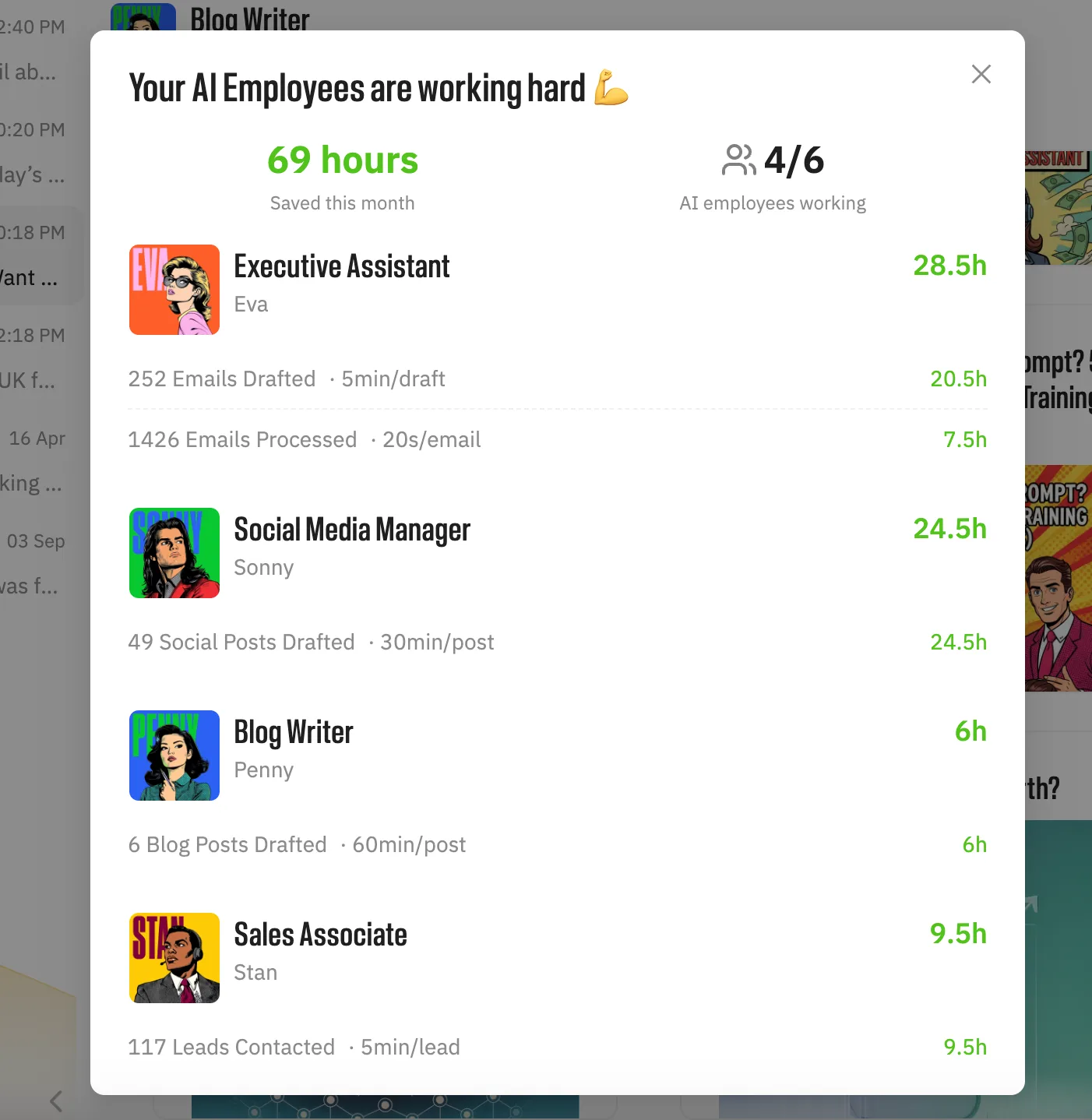
There are two real options: buy a role owner that arrives pre-configured, or build it yourself with a no-code agent builder. Neither is right for everybody. Which one wins comes back to the same question: how much of the setup are you willing to do yourself, and how much do you want handed over?
How to start with an AI employee
If a job cleared those three tests, your first month decides whether this works at all. Four steps, and the order matters.
1. Pick the one role where work is actively falling through
Start with one rather than six. The right first role is not the one you dislike most. It is the one where something measurable is being lost: calls going to voicemail, quotes not chased, posts not going out. If you cannot name what is being lost, you have picked the wrong role.
2. Give it your business, once
Connect the accounts that role touches. Then write down the things you would otherwise explain to a new hire: your pricing, what you will and will not discount, your tone, which clients are the important ones. This is the part the marketing skips and it takes an afternoon, not five minutes.
3. Leave the approval step on longer than feels necessary
For the first month, read what it would have sent before it sends anything. You are not checking whether it works. You are learning where its judgment differs from yours, which is the only way to know what you can safely stop reading. The cost of over-supervising for a month is trivial. The cost of discovering in month three that the follow-ups quietly stopped is not.
4. Add the second role only when the first one is boring
Boring is the signal. When you stop opening the drafts because they are consistently right, that role is done and you have capacity to onboard another. Switching on six at once means supervising six things badly.
What it looks like when several roles run together
Here is why I think that fourth step is worth the patience rather than a reason to stall. Once the second role does come on, it is worth more to you than the first was, because the two share one record of your business instead of each holding a fragment. A new enquiry shows the chain best.
Rachel does not hand Stan a summary; they are looking at the same record. The objection raised on the call is already there when the follow-up is drafted, and the terms discussed are there again when Linda drafts the agreement. That is the part a stack of separate tools cannot do, and it is why the value is not simply six times one role. Every arrow still terminates at you: nothing is sent, posted or signed without your approval.
Marblism is one example of the role-based approach: all six roles on one plan, from $24 a month on annual billing (see pricing), with the full lineup on the AI employees hub.
Two neighbouring decisions have their own pages. If you are weighing this against hiring a person rather than buying software, that trade-off predates AI and is better understood: what a virtual assistant is. If you want how the category arrived and why the label spread so fast, that is the rise of AI employees.
Frequently asked questions
What the terms mean
What is the difference between an AI employee and an AI agent?
An AI agent completes one goal you hand it, choosing its own steps along the way, and stops when the goal is done. An AI employee owns an ongoing role instead, starts work on its own when something happens, and keeps context between jobs. Most AI employees are built on agent technology, so the difference is scope and packaging rather than a different underlying system.
What does an AI employee do?
An AI employee owns an ongoing business role rather than a single task, most often executive assistant, receptionist, sales agent, social media manager, content writer or legal assistant. Day to day it watches the systems that role touches, such as the inbox, the calendar, the CRM or the phone line, and starts work when something happens there rather than when you prompt it. It hands anything irreversible, such as sending an email or publishing a post, back to you for approval.
What do you call an AI employee?
The same idea is sold as a digital worker, a digital employee, an AI worker, an AI coworker or AI staff. These are marketing labels rather than technical categories, and they are used interchangeably across the industry. None of them tells you how much of a job the software actually owns, which is the thing worth checking.
Is AI employee also a job title for a person?
No. Some people searching this phrase are looking for careers in artificial intelligence, or for guidance on staff using AI at work, which are different topics entirely. In a software context, an AI employee is always a product rather than a person, and no human holds the job title.
Cost and products
What is the salary of an AI employee?
An AI employee does not earn a salary, because it is software rather than a person. You pay a subscription instead, roughly $44 to $200 a month for a role-based platform that owns a whole job, or from $24 a month on annual billing. The salary comparison that does matter is the human one it stands in for: the median administrative assistant earns $47,540 a year in wages according to Bureau of Labor Statistics data, which is roughly $68,000 a year in true employer cost once benefits are added, or about $5,700 a month.
How much does an AI employee cost?
Role-based AI platforms run from roughly $44 to $200 a month at list monthly rates: Marblism lists $44 a month billed monthly, or $24 a month billed annually, and Lindy runs from $49.99 to $199.99 a month. Both meter how much work the fee buys, so compare the allowance as well as the price. For comparison, the median administrative assistant earns $47,540 a year in wages according to Bureau of Labor Statistics data, which works out to roughly $68,000 a year in true employer cost once benefits are included, or about $5,700 a month.
Are there free AI employees?
There are free AI assistants and free tiers of agent builders, but there is no meaningful free version of software that owns a whole role. Running continuously in the background costs the vendor money every day, so free plans in this category are trials or heavily capped demos. A capped trial is normal; a genuinely free role that runs indefinitely is not.
Getting one
Are AI employees real?
Yes, in the sense that software can now take a whole job and keep doing it without being asked. No, in the sense that it is not an employee in any legal way. There is no contract, no notice period, and no way to pass on the blame when something goes wrong. What you can have is software doing the repetitive part of a job while a person keeps the judgment calls.
Can an AI employee replace a human hire?
An AI employee can replace the routine volume of a role, not the role itself. The reliable pattern is the software handling repetitive high-frequency work while a person keeps the judgment calls, the relationships and anything that needs accountability. Businesses that hand over an entire job with no supervision usually discover the gap several weeks later.
How do I hire an AI employee?
Hiring an AI employee is a purchase rather than a recruitment process. There is no interview, no offer letter, no notice period and nobody to add to payroll. You pick a plan, sign up, and the role starts once it has access to the systems it works in.
To see what a role-based lineup covers, Marblism's AI employees hub lists each role as a named employee with a defined job. Eva takes the inbox, Rachel the phones, Linda the contracts. Plans start at $44 a month billed monthly, or $24 a month if you pay for the year.